
SIGNL4 Integration with Reply
Reply is a group of companies providing consulting, systems integration and digital services. Its offerings include IT observability, security operations and automated incident response. For example, Technology Reply describes enterprise monitoring solutions based on Prometheus and Grafana, while Cassiopea Reply is an AI-assisted platform for IT event management and remediation.
SIGNL4 can complement Reply-designed or Reply-operated solutions with reliable mobile alerts via app push, SMS and voice calls, automated escalation, on-call scheduling and mobile incident response. An HTTP webhook is a simple integration approach when the specific Reply solution or its underlying monitoring/automation tool supports outbound HTTP requests.
Typical use cases include:
- Escalating critical infrastructure and application incidents to on-call teams
- Notifying security analysts about high-priority security events
- Involving an engineer when an automated remediation cannot resolve a problem
- Alerting support teams about failed batch jobs, integrations or cloud services
- Routing urgent incidents to the right team outside business hours
Integration scope: Reply is not a single software product with a universal webhook configuration. This guide describes a reusable integration pattern for solutions implemented by Reply, not an independently verified native Reply-to-SIGNL4 connector. The exact event source, menu names and webhook capabilities depend on the project and technology used.
Prerequisites
- A SIGNL4 account and a configured team
- A Reply-managed or Reply-built monitoring, security or automation workflow
- An event source that can issue an outbound HTTPS POST request, directly or via a workflow tool such as Grafana, n8n or an integration service
- Network access to
https://connect.signl4.comon HTTPS port 443
How to Integrate
1. Get Your SIGNL4 Webhook URL
In SIGNL4, use an existing team/integration webhook or create one. The endpoint has the following format:
https://connect.signl4.com/webhook/YOUR_SIGNL4_SECRET
Replace YOUR_SIGNL4_SECRET with your SIGNL4 team or integration secret. Treat this URL as confidential, since the secret in the URL authenticates incoming events.
For details, see the SIGNL4 webhook documentation.
2. Select a Suitable Event Source
Identify where your Reply solution detects and processes critical events. Examples include:
- Grafana-based observability: Configure alert rules and route selected notifications to an appropriate webhook-compatible contact point or integration workflow.
- Security operations: Forward high-priority incidents from the deployed SIEM, SOAR or security workflow if outbound HTTP is supported.
- IT event automation: Add an HTTP POST action to a custom workflow after a failed remediation or when human approval is needed. For Cassiopea Reply, verify the available integration mechanism in your specific deployment; a native SIGNL4 action is not documented here.
The following steps assume that your chosen component can send a configurable HTTP request. They are generic implementation instructions, not product-specific Reply UI steps.
3. Configure the Outbound Webhook
Configure the HTTP action with these settings:
Method: POST
URL: https://connect.signl4.com/webhook/YOUR_SIGNL4_SECRET
Content-Type: application/json
Use a JSON body that describes the incident. For example:
{
  "Title": "Critical: Application service unavailable",
  "Message": "The production API is unavailable. Automated recovery was unsuccessful; operator intervention required.",
  "Source": "Reply-managed observability workflow",
  "Service": "Production API",
  "Severity": "Critical",
  "Environment": "Production",
  "Runbook": "https://example.com/runbooks/production-api",
  "X-S4-Service": "IT Operations",
  "X-S4-ExternalID": "INC-1042",
  "X-S4-Status": "new"
}
Replace the example values and URLs with actual event fields from your environment. SIGNL4 displays additional JSON properties as alert context. X-S4-Service can categorize the alert, and X-S4-ExternalID identifies it for subsequent status synchronization. Ensure any referenced SIGNL4 category exists and that your team’s routing and on-call schedules are configured.
4. Test the Webhook
Before configuring the source system, send a test event using cURL:
curl -X POST 'https://connect.signl4.com/webhook/YOUR_SIGNL4_SECRET' \
  -H 'Content-Type: application/json' \
  -d '{
    "Title": "Reply integration test",
    "Message": "Testing a critical incident notification from an IT workflow.",
    "Source": "Reply integration test",
    "X-S4-ExternalID": "REPLY-TEST-001",
    "X-S4-Status": "new"
  }'
Check that the alert appears in SIGNL4 and reaches the expected on-call person. Then trigger a test incident from the actual monitoring or automation workflow to verify the complete path.
5. Optionally Resolve Alerts Automatically
If your source workflow reports recovery and can send another request, reuse the same external ID to close the existing alert:
{
  "X-S4-ExternalID": "INC-1042",
  "X-S4-Status": "resolved"
}
This lets SIGNL4 close an alert when its corresponding incident is resolved. The original alert must have been created with the same external ID.
6. Optionally Send Acknowledgements Back
SIGNL4’s outbound webhook can communicate acknowledgements and status changes to another system. This requires a suitable receiving HTTP endpoint and event-to-incident mapping in the Reply solution; it is not automatic two-way synchronization.
Example
An enterprise service monitored through a Reply-implemented observability solution becomes unavailable. The monitoring platform detects the problem and an automated recovery attempt fails. A workflow sends the incident details to SIGNL4, which notifies the current on-call engineer and escalates if needed.
Application / Infrastructure
           |
           v
Reply-built monitoring or automation workflow
           |
           v
Critical event / failed remediation
           |
           v
HTTPS POST to SIGNL4 webhook
           |
           v
SIGNL4
   |-- Mobile app push
   |-- SMS and voice calls
   |-- On-call routing
   |-- Automated escalation
   `-- Acknowledgement and collaboration
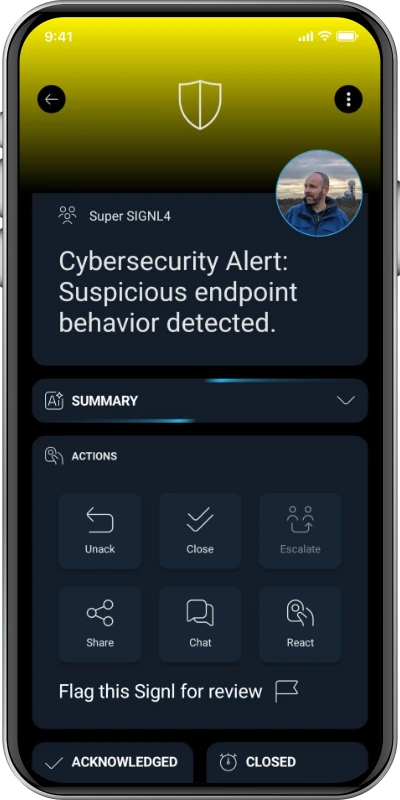
An alert in the SIGNL4 app looks similar to this example:
Alternative: Email Integration
If the underlying system can send emails but cannot make HTTP requests, it can send notifications to your SIGNL4 team’s dedicated email address instead. See the SIGNL4 email integration. This is also a generic pattern; email support depends on the source system.
References
- Reply
- Technology Reply: Enterprise monitoring with Prometheus and Grafana
- Spike Reply: Application security and observability
- Cassiopea Reply: IT automation and event management
- SIGNL4 inbound webhook
- SIGNL4 email integration
Validation: This is a proposed integration pattern. It has not been tested against a particular Reply deployment, and Reply-specific UI configuration steps are not claimed.