
SIGNL4 Integration via Email (SMTP)
SIGNL4 makes it easy to turn emails from almost any system into reliable mobile alerts.
Each SIGNL4 team has a dedicated email address:
{teamsecret}@mail.signl4.com
Simply send an email to this address to alert the team. SIGNL4 can automatically route the alert to the team members currently on duty and notify them according to your configured notification and escalation settings.
Global email addresses with routing rules can also be configured for more advanced scenarios.
Trigger Alerts
You can send almost any standard email to SIGNL4. SIGNL4 processes the subject, message body, and supported attachments and creates an alert.
This makes email integration useful for systems that do not provide a webhook or REST API but can send email notifications.
SIGNL4 supports:
- Email subject and body
- Plain-text alert parameters
- Attachments such as images and audio files
- On-call and shift-based routing
- Mobile push, SMS, and voice calls
- Acknowledgements and escalation
- Alert resolution using an external ID
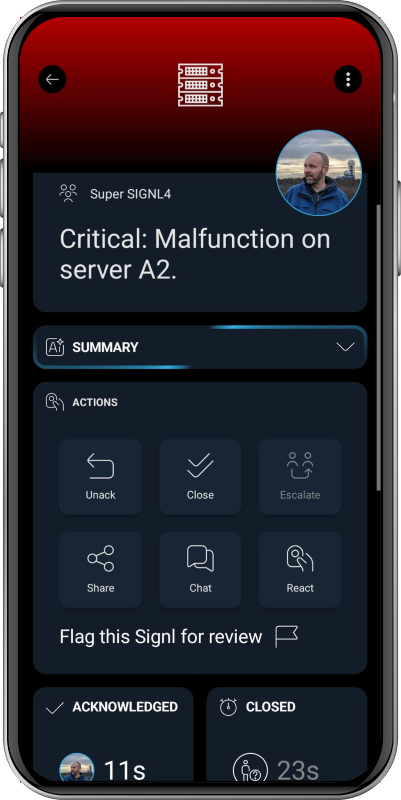
Basic Example
For a simple integration, just send a regular email.
Subject: Server Down
Server A2 is not responding.
SIGNL4 will create an alert using the email content.
Structured Email Content
For more control over the alert, send a plain-text email containing parameter/value pairs.
For example:
Title: My Alert
Message: Hello world.
You can add additional parameters in the same way:
Parameter: Value
Many of the parameters supported by the SIGNL4 webhook integration can also be used in emails. See the SIGNL4 webhook integration for available parameters.
Trigger and Resolve Alerts
You can correlate events using X-S4-ExternalID. This allows a later email to automatically resolve the corresponding alert.
Trigger an Alert
Subject: Server Down
Message: Server A2 is down.
X-S4-ExternalID: 1234
X-S4-Status: new
SIGNL4 creates a new alert with the external ID 1234.
Resolve the Alert
When the system recovers, send another email with the same external ID and the status resolved.
Subject: Server Up
Message: Server A2 is available again.
X-S4-ExternalID: 1234
X-S4-Status: resolved
SIGNL4 matches the external ID and closes the corresponding alert.
More information about resolving alerts is available in Resolve Alerts Automatically.
Typical Use Cases
Email is often the easiest way to connect systems that already support email notifications, including:
- Monitoring and observability tools
- Industrial and production systems
- Network devices and appliances
- Backup and security solutions
- Building and facility management systems
- Legacy applications
Instead of relying on an email sitting in an inbox, SIGNL4 turns the message into an actionable mobile alert with on-call routing, acknowledgement, and automated escalation.