
SIGNL4 Integration with Zscaler
Zscaler provides cloud security and digital experience monitoring solutions, including Zscaler Internet Access (ZIA) and Zscaler Digital Experience (ZDX).
SIGNL4 adds reliable mobile alerting to Zscaler events with app push notifications, SMS, voice calls, on-call scheduling, acknowledgement and automated escalation. Security operations and IT teams can respond to important alerts even when nobody is watching a dashboard.
Typical use cases include:
- critical security and threat detection alerts from ZIA
- suspicious activity and policy-related security alerts
- urgent user experience or application performance incidents from ZDX
- connectivity and network performance degradation affecting users
- after-hours escalation to the responsible SOC or IT operations team
Prerequisites
- A SIGNL4 account and a team or integration secret
- A Zscaler tenant with permissions and entitlements to configure alert rules and webhooks in ZIA or ZDX
- An HTTPS endpoint reachable from Zscaler
- Optionally, an HTTPS relay such as a small Azure Function, if Zscaler’s webhook authentication or fixed payload requires adaptation
How to Integrate
ZIA and ZDX support outbound webhooks for configured alert rules. The simplest approach to try is to point a Zscaler webhook at the SIGNL4 incoming webhook URL. As the outbound webhook’s authentication and body format are controlled by Zscaler, test direct delivery with your tenant before relying on it in production. If authentication or payload handling is incompatible, use the relay approach below.
1. Create the SIGNL4 Webhook
In SIGNL4, create an incoming webhook integration or use your team secret. The URL is:
https://connect.signl4.com/webhook/YOUR_SIGNL4_SECRET
Replace YOUR_SIGNL4_SECRET with your actual team or integration secret. The URL contains a secret and should not be disclosed publicly.
The SIGNL4 webhook accepts JSON, text and XML. Arbitrary JSON properties can provide useful context; Title and Message provide a readable alert title and description.
2. Configure a ZIA Security Alert Webhook
For Zscaler Internet Access (ZIA), navigate to the webhook configuration in the Zscaler Admin Console. Depending on the console version, the path is under:
Administration > Alerts > Security & UEBA Alerts > Webhooks
- Select Add Webhook.
- Enter a name, e.g.
SIGNL4 Security Alerts, and enable it. - Enter your SIGNL4 webhook URL as the destination.
- Select the authentication type requested by the Zscaler form (Basic or Token). SIGNL4’s secret-in-URL webhook does not require Basic or Bearer authentication. Do not assume an arbitrary credential will be accepted: test the configuration; if you cannot configure a compatible request, use a relay.
- Use Test Webhook. If it succeeds, save and activate the webhook.
- Create or edit the relevant Security & UEBA alert rules and associate the new webhook with the rules that should reach the on-call team.
Choose a limited set of actionable high-severity rules to avoid excessive mobile notifications.
Official Zscaler references: Adding a Webhook and About Webhooks.
3. Alternative: Configure a ZDX Digital Experience Webhook
For Zscaler Digital Experience (ZDX), configure a webhook for application, device or network performance incidents:
- Go to Policies > Digital Experience Monitoring > Webhooks (navigation may differ with newer Zscaler UI releases).
- Select Add Webhook, enter a name such as
SIGNL4 ZDX Alertsand enable it. - Enter the SIGNL4 webhook URL.
- Choose the available authentication method. ZDX supports Basic, Token and, in some cases, OAuth. The SIGNL4 secret-in-URL webhook does not need these methods. Zscaler’s documentation mentions a placeholder token for webhook destinations that authenticate through their URL; this still needs testing with SIGNL4.
- Select Test Webhook, save the configuration, and assign it to the appropriate ZDX alert rules.
Official reference: Configuring ZDX Webhooks.
4. Test the Alert in SIGNL4
Trigger a Zscaler test webhook and check whether a readable event reaches your SIGNL4 team. Verify the alert content and the configured escalation behavior. A successful Zscaler test request by itself does not prove that a useful SIGNL4 alert was created.
A direct integration, where compatible, follows this path:
Zscaler ZIA / ZDX alert rule
        |
        v
Zscaler outbound webhook
        |
        v
SIGNL4 incoming webhook
        |
        +--> Mobile app push / SMS / voice call
        +--> On-call routing
        +--> Automated escalation
        +--> Mobile acknowledgement
5. Optional: Normalize Alerts Through an HTTPS Relay
A small relay is the most flexible option when Zscaler requires Basic or Bearer authentication, or when its default webhook JSON needs to be transformed. For example, receive the event in an Azure Function, validate the incoming Zscaler credentials, map a few useful fields, and POST a normalized JSON body to SIGNL4.
Example normalized payload (illustrative, not a claim about Zscaler’s native webhook schema):
{
  "Title": "Zscaler: Critical security alert",
  "Message": "A high-priority security event requires investigation.",
  "Product": "ZIA",
  "Severity": "Critical",
  "Rule": "Example security alert rule",
  "User": "user@example.com",
  "X-S4-Service": "Security",
  "X-S4-SourceSystem": "Zscaler",
  "X-S4-ExternalID": "zscaler-event-12345",
  "X-S4-Status": "new"
}
Send the resulting payload as an HTTP POST with Content-Type: application/json to your SIGNL4 webhook URL. Field mappings, event IDs and optional status changes must be adapted to actual Zscaler webhook events captured from your tenant. For alert resolution, send a later event using the same X-S4-ExternalID and X-S4-Status set to resolved, if the Zscaler event source supplies a reliable recovery event.
Zscaler alert rule
       |
       v
Webhook -> HTTPS relay (optional)
               | authenticate, filter, normalize
               v
         SIGNL4 webhook
               |
               v
       On-call SOC / IT team
For details of SIGNL4’s accepted formats and special properties, see the SIGNL4 Webhook Integration.
Example
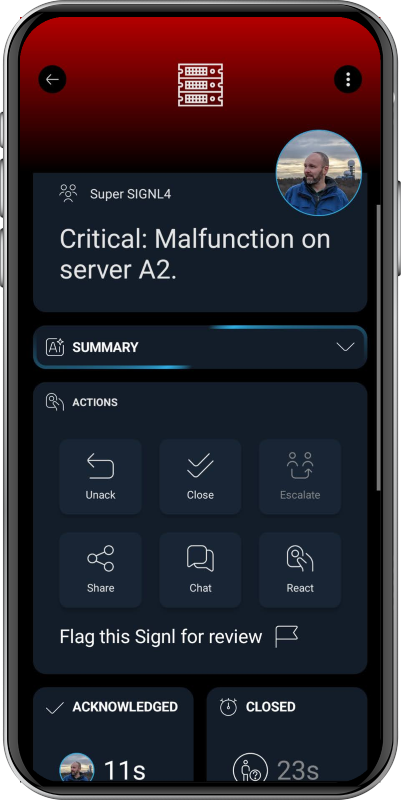
A Zscaler security alert rule detects an incident requiring prompt investigation. Its webhook forwards the event to SIGNL4, directly or through the relay. SIGNL4 sends mobile notifications to the security team member on call, escalates according to the configured policy, and lets the responder acknowledge the alert from a phone.
The alert in SIGNL4 might look like this (illustrative app screenshot):
That’s it. Zscaler alerts can now reach the right people with SIGNL4 mobile alerting and automated escalation.
References
Validation note: This is a proposed integration pattern based on vendor documentation. It has not been verified against a live Zscaler tenant. Zscaler entitlement, UI navigation, webhook authorization and actual payload structure can vary.